Adapting to the iPhone Camera Ecosystem: From Android's Open Architecture to Apple's Integrated Approach
Adapting to the iPhone Camera Ecosystem
For Android users considering or who have already made the leap to iPhone, the camera system often presents a significant shift in user experience. While both platforms offer impressive imaging capabilities, their underlying philosophies and approaches differ substantially. Android's more open architecture allows for greater customization and third-party integration, while Apple prioritizes a tightly integrated, consistent experience across its hardware and software.
Editor's pick: Android-to-iPhone migration accessories on Amazon → As an Amazon Associate, this site earns from qualifying purchases.
Understanding the iPhone Camera Hardware
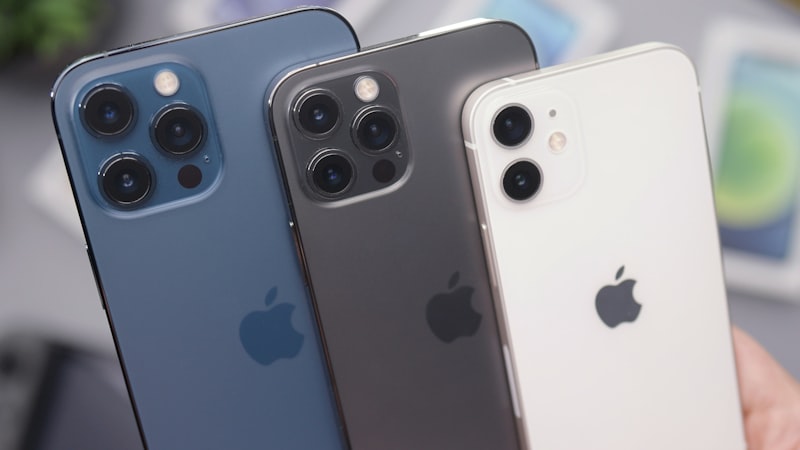
The iPhone camera system has evolved significantly over the years, consistently pushing the boundaries of mobile photography. While megapixel counts are important, Apple focuses on computational photography and sensor technology. Features like sensor-shift stabilization, Deep Fusion, and the Photonic Engine are all designed to extract the maximum detail and dynamic range from the hardware. The ongoing development of the iPhone camera system is something we cover closely at our sister site, iPhone Arc, where we analyze the evolving industrial design and materials used in each generation.
The Integrated Software Experience
One of the most significant differences between the Android and iPhone camera experiences lies in the software integration. On Android, manufacturers often heavily customize their camera apps, sometimes leading to inconsistent performance and feature sets across different devices. Apple, on the other hand, maintains tight control over both the hardware and software. This allows for seamless integration of features like Portrait mode, Cinematic mode, and ProRes video recording. The native camera app is generally considered to be the best way to leverage the full capabilities of the iPhone camera system.
Third-Party Camera Apps on iPhone
While the native camera app is powerful, the App Store offers a wide range of third-party camera apps. These apps can provide additional features and controls, such as manual focus, advanced metering modes, and RAW image capture. However, it's important to note that third-party apps may not always have the same level of access to the iPhone's camera hardware as the native app. This can sometimes result in slightly different image quality or performance.
Adapting to the Workflow
Android users accustomed to easily accessing and managing photos through the file system may find the iPhone's Photos app a bit restrictive at first. While the Photos app offers robust organization and editing tools, it doesn't provide the same level of direct file access as Android. However, iCloud Photo Library can be a powerful tool for syncing and backing up photos across multiple devices.
Tips for Android Switchers
- Explore the Native Camera App: Take the time to familiarize yourself with all the features and settings available in the native camera app.
- Embrace iCloud Photo Library: Use iCloud Photo Library to seamlessly sync your photos across all your Apple devices.
- Consider Third-Party Apps: Experiment with third-party camera apps to find the ones that best suit your needs.
- Learn the Editing Tools: The Photos app offers a wide range of editing tools that can help you enhance your photos.
- Understand the Format Options: iPhone offers different capture formats like HEIF and JPEG. HEIF is more storage efficient, but JPEG is more universally compatible.
The Future of iPhone Camera Technology
Apple continues to invest heavily in camera technology. Recent patents suggest ongoing exploration of advanced sensor technology, computational photography techniques, and augmented reality integration. As we've discussed at iPhone View, the constant refinement of display technology is also intrinsically linked to the photographic experience, allowing for more accurate image representation and more immersive viewing. The future of iPhone photography promises even more innovative features and capabilities, further blurring the lines between mobile and professional-grade photography.
Switching to the iPhone camera ecosystem from Android requires a shift in mindset. By understanding the underlying principles and taking the time to learn the ropes, Android switchers can unlock the full potential of the iPhone's powerful camera system and enjoy a seamless and rewarding photographic experience.
Questions readers ask
Is adapting camera ecosystem realistic for the next iPhone, or further out?
Most signals point to a later cycle rather than imminent release. Component lead times for adapting camera ecosystem suggest Apple is still validating the supply side, and the company tends to wait until yields hit production targets before committing on stage.
What's the biggest tradeoff Apple has to swallow for adapting camera ecosystem?
Every Apple decision is a tradeoff, and the obvious one here is internal volume. Adding adapting camera ecosystem costs millimetres somewhere — usually battery capacity or camera module depth — and Apple has to decide which line item to trim.
What does adapting camera ecosystem actually cost — in price, weight, or battery?
Expect a premium of roughly $200–300 over the standard model, plus a small weight penalty. Battery life is the bigger variable — early prototypes typically trade an hour or two of screen-on time for the new capability, then claw it back over a generation.
How does adapting camera ecosystem change the upgrade calculus for existing owners?
Existing owners weigh adapting camera ecosystem against the upgrade they were already planning. If the feature is meaningful for daily use, it pulls forward upgrades by about a year; if it is novelty, it shifts nothing.
In short — what's the takeaway on adapting to the workflow?
It comes back to whether Apple can ship adapting camera ecosystem without compromising the parts of the iPhone people already pay for. The detail in this section is where that case is made or broken.